


PHP2Shell is a pair of critical PHP flaws, fixed on October 21, 2026, that can let an attacker run code on your web server without logging in. To fix it, update PHP to 8.5.12, 8.4.27, 8.3.36 or 8.2.35 (or newer) and restart it. This plain-English guide shows how to check your site, fix it and use your AI to help.
Facts checked October 22, 2026
Key points
- What happened: On Oct 21, PHP, the software behind most websites including WordPress, fixed two serious security holes nicknamed "php2shell" that let a stranger take over a website's server with no password.
- Who's at risk: Any site on PHP that hasn't installed the Oct 21 fix.
- Do this today: Ask your web host or developer to confirm the fix is installed. Our ready-to-send email is below.
- Check it yourself: Three yes-or-no questions and the safe version numbers.
- Use your AI: Five copy-paste prompts for Claude or ChatGPT to find, fix and check for break-ins.
What is the PHP2Shell vulnerability?
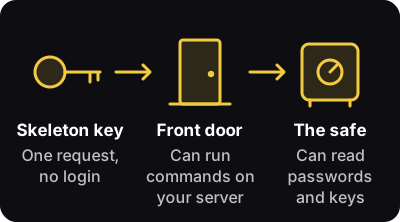
PHP is the engine under WordPress, Drupal, Magento and about 69% of websites whose programming language is known, by W3Techs' count. On October 21, 2026, the PHP project released a fix, or patch, for two critical flaws nicknamed php2shell. The PHP project's security notice says one web request (one message sent to your site) from a stranger, with no login, can let them run their own commands on your server. Researchers at Calif, Wiz and OpenAI reported the flaws after AI tools helped find them (php2shell.com). CISA, the US government's cyber defense agency, says to update now.
How serious is PHP2Shell for my business?
If your PHP isn't fixed:
- Your website, taken over. In effect, your server takes orders from a stranger.
- Passwords and keys exposed. Wiz says attackers can read secrets, such as passwords and keys, from the server's memory. For a business, that can mean database passwords and keys: the codes that connect your site to payment and cloud services.
- A leak you may not spot. Wiz says these leaks can be hard to detect. After the fix, your host or developer should change the database passwords and the payment and cloud keys. Ask which ones you need to change yourself.
Are attackers using it yet? Reports differ. Amazon says its decoy servers logged an attack attempt on October 17, four days before the fix, and Cloudflare has seen attack traffic aimed at its customers. CISA had not seen attacks when it posted its alert, and when we checked on October 22, neither bug was on its list of known exploited flaws. We found no public report of a confirmed break-in at a real company. Patch anyway.
Is my website affected by PHP2Shell?
Does PHP2Shell affect WordPress, WooCommerce or Shopify?
Do you use any of these? They run on PHP. If yes, answer the three questions below.
 WordPressWebsites and blogs
- WooCommerceWordPress stores
- DrupalCompany and organization sites
- JoomlaCompany and organization sites
- Magento / Adobe CommerceOnline stores
- PrestaShopOnline stores
- LaravelCustom web apps and portals
- SymfonyCustom web apps and portals
- MoodleOnline courses
- Shopify store?Shopify runs your store's servers, so there's no PHP for you to update. A Shopify app or integration built in PHP runs on its maker's server: ask the maker.
- Custom-built site or app?Ask your developer what it's built with. If the answer includes PHP, it's on this list.
Answer three yes-or-no questions.
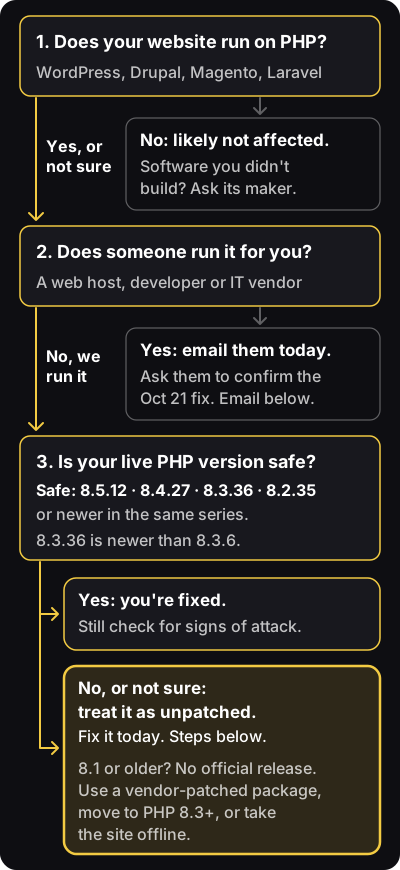
- Does your website run on PHP? WordPress, Drupal, Magento and Laravel do. No: you're likely not affected, but ask the makers of software you didn't build. Yes, or not sure: go to 2.
- Does a web host, developer or IT vendor run it for you? Yes: email them today. No: go to 3.
- Is your live PHP version safe? Live means the version your site runs right now. In WordPress, find it under Tools > Site Health > Info > Server; in cPanel, the control panel many hosts provide, open MultiPHP Manager. Safe: 8.5.12, 8.4.27, 8.3.36 or 8.2.35, or newer in the same series. Yes: you're fixed, but check for signs of attack anyway. No, or not sure: treat it as unpatched and fix it today.
- Compare piece by piece. 8.3.36 is newer than 8.3.6, because 36 is more than 6. "Same series" means the first two numbers match.
- Lower number? Linux vendors and cPanel often fix older versions without changing the number. A lower number may still be fixed, but treat it as unpatched until your host or vendor confirms in writing.
How do I fix PHP2Shell? 3 steps to update PHP
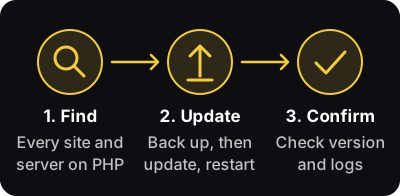
- Find. List every website and server on PHP, including the ones people forget (old campaign sites, blogs on a subdomain, staging copies, intranets). Include software with PHP built in, as CISA advises; NCSC-NL, the Dutch national cyber security center, lists affected products for your IT team. Prompt B helps you make the list; your developer can use Prompt C.
- Update. Save a copy of the logs and back up first, and test on a copy if you can. Then install the fixed PHP and restart it. If a host runs your site, the host does this. WordPress says no WordPress update is needed, because the flaw is in PHP. Updating plugins or themes won't fix it.
- Confirm. Get the live PHP version in writing. Then have the logs (the server's record of visits and errors) checked for signs of attack (Prompt E). Found something? Patch first, then call your host or a security professional.
On PHP 8.1 or older? There's no official release, but some hosts and Linux vendors have patched versions, so ask your host first. No patch? Move to PHP 8.3 or newer. Back up and test on a staging copy (a private test copy of your site) first, because old plugins or themes can break. If neither can happen, CISA says to take the site offline until it's fixed.
Can't fix it today? CISA says to take PHP systems offline until they're patched. A WordPress maintenance-mode plugin doesn't count, because PHP reads the attack before WordPress runs (Sansec). Ask your host or developer to switch it off or show a plain static page. A web application firewall (WAF), a filter that blocks bad requests, buys time. Cloudflare says its free and paid WAF customers have been protected by default since October 21; paid plans should check that the Managed Ruleset is set to block. It covers only traffic through Cloudflare, so attackers can go around it, straight to your server. Only a PHP update fixes it.
What should I email my web host or developer?
Fill in the brackets and send it today. The CVE numbers are the public ID numbers for the two flaws, like case numbers.
Please confirm our php2shell fix
Hi [name],

Please confirm that the October 21, 2026 PHP security fix for CVE-2026-109618 and CVE-2026-109619 (php2shell) is installed on every server that runs our websites and apps. Before you restart anything, please save a copy of our logs.

Please tell us:
1. Which PHP version and package each site runs now.
2. Whether PHP was restarted after the update.
3. Your plan for anything still on PHP 8.1 or older.
4. Whether you have checked our logs for signs of an attack, back to at least October 17.
5. Once patched, which passwords and keys you will change, and which we need to change.

Please reply by [time] today. Please don't send any passwords or keys by email.

Thank you,
[your name]
No clear answer by tomorrow morning? Call their support line, read them these questions, and check their status page. Paste their answer into Prompt A.
Can ChatGPT or Claude help me fix PHP2Shell?
Do you use Claude or ChatGPT? Either can explain your risk and draft replies. Copy a prompt, fill in the brackets, and paste it in. Your AI should send you to the official update and its instructions, not invent a workaround; the prompts tell it so.
AI coding tools, such as Claude Code and Codex, can also run commands on a computer, sometimes without asking first. Claude Code starts in Auto mode, where a classifier approves actions for you; switch it to Manual mode, which asks for your approval. Make sure any coding tool asks before it acts.
Prompt A: Explain my risk
When to use it: In a normal chat. Paste in your host's or developer's reply, or the PHP version line from Site Health.
I run a business and I'm not technical. Our website is [what it is, for example "a WordPress store"], and [host, developer or IT vendor] runs it.

php2shell is new, so you may not know it yet. Treat these facts as correct (source: php.net security advisory, October 21, 2026): two critical PHP flaws, CVE-2026-109618 and CVE-2026-109619, were fixed on October 21, 2026. Safe PHP versions are 8.5.12, 8.4.27, 8.3.36 and 8.2.35, or newer in the same series. PHP 8.1 and older have no official release, but some vendors ship patched packages. Linux vendors and cPanel can fix older versions without changing the number.

Here is what I have:
[paste their reply, or the PHP version line from WordPress Site Health, with any passwords or keys removed. Nothing yet? Write "none yet".]

Please:
1. For each site, tell me if we are fixed: Yes, No or UNKNOWN. Say Yes only if WordPress Site Health shows a safe version, or if they name a safe version (or a vendor package they say includes both CVE fixes) AND confirm PHP was restarted after the update. Otherwise say UNKNOWN. Never assume we are safe.
2. In 3 short bullets, explain what could go wrong for my business if we are not fixed.
3. Write a short, polite message I can send them, asking only for what is missing.
If you mention a fix, point only to the official update: PHP's security notice (https://www.php.net/archive/2026.php#2026-10-21-5) or our host's own security update. Never invent a workaround.
Use plain English. Never ask me for a password or key.
Prompt B: What else might run PHP?
When to use it: In a normal chat, to build your list for step 1.
I run a business and I'm not technical. php2shell is a pair of critical PHP flaws (CVE-2026-109618 and CVE-2026-109619) fixed on October 21, 2026. CISA says to check PHP built into other software too.

Here are the websites and software our company uses:
[list them: main site, online store, blogs, old campaign sites, staging copies, intranet, booking or support tools, anything a vendor installed for us]

Please:
1. Tell me which of these could run on PHP: Likely, Possible, Unlikely or UNKNOWN. Say UNKNOWN rather than guess.
2. For each one that isn't Unlikely, tell me who to ask (our host, our developer or the software's maker) and give me one short question to send them.
Use plain English. Never ask me for a password or key.
Prompts for your developer (copy and send, no need to read)
Forward these to whoever has access to your code or servers. They run them in order, in one session, in Claude Code's Manual mode or another AI coding tool set to ask before it acts. Anthropic's security docs say reviewing commands is the user's job.
Prompt C: Find every website and server we run on PHP
What it does: Finds every place you run PHP, and its version. It changes nothing.
Ground rules for this session:
- This task is read-only. Do not install, upgrade, restart, edit or create anything, including phpinfo() or test files on a web server.
- Never ask me to paste passwords, API keys, SSH keys or .env files, and don't open or print them yourself (skip .env, wp-config.php and key files when searching). If a command needs a password, give me the command to run in my own terminal.
- Do not download or run any php2shell exploit, "PoC" or scanner from the internet (except OpenAI's official checker at github.com/openai/php2shell-checker, if I ask for it).
- Show me each command, and what it does, before you run it.
- If you can't verify something, say UNKNOWN. Never assume it's safe.

Task: check us for php2shell (CVE-2026-109618 and CVE-2026-109619). It's new, so use these facts from php.net's October 21, 2026 advisory (https://www.php.net/archive/2026.php#2026-10-21-5): safe versions are 8.5.12, 8.4.27, 8.3.36 and 8.2.35, or newer in the same branch. PHP 8.1 and older have no official release; some vendors ship patched packages.

Find every place we run PHP, and its version:
1. Code: Dockerfiles, docker-compose and Kubernetes files (FROM php:..., and images with PHP inside, such as the official wordpress, drupal or joomla images), CI files (.github/workflows, .gitlab-ci.yml), composer.json, .php-version, .tool-versions, and hosting or infrastructure config.
2. Servers: the PHP that serves the website (PHP-FPM, the Apache module, LiteSpeed or FrankenPHP), not only `php -v`, because they can differ. If a version looks old, check the package changelog for the two CVE numbers; Linux vendors often fix old versions without changing the number. If you can't reach a server from here, don't ask for access: give me the read-only commands to run there, and wait for me to paste back the output.
3. Managed hosting: tell me where the PHP version shows in the control panel, and draft a 3-sentence note asking the host to confirm the fix and the restart.
4. Other products: software we bought that has PHP built in (CISA says to include it). List what you find as UNKNOWN for me to check with the vendor.

Give me one table:
Where | Version running | How you know (file and line, or command output) | Safe? (Yes / No / UNKNOWN) | Next step
The PHP version in composer.json does not prove what the server runs.
Then add a 5-line, plain-English summary for a non-technical owner.
Prompt D: Plan and apply the update safely
What it does: Next, in the same session. It saves the logs, updates a test copy first, and stops for your approval before it touches the live site.
Ground rules: Never ask me to paste passwords or keys, and don't print secret files. Do not download or run any php2shell exploit or scanner. Show me each command, and what it does, before you run it. If you can't verify something, say UNKNOWN. If you can't reach a server, or a command needs a password, give me the command to run myself. Use only the official fix and its instructions: PHP's security notice (https://www.php.net/archive/2026.php#2026-10-21-5) and our host's or Linux vendor's security update. Never invent a workaround or edit PHP's own code.

Safe versions are 8.5.12, 8.4.27, 8.3.36 and 8.2.35, or newer in the same branch, or a vendor package whose changelog lists CVE-2026-109618 and CVE-2026-109619.

Plan the php2shell fix and apply it to a staging copy first.
1. Before changing anything, check free disk space, then save a compressed copy of production's web server, PHP-FPM, app and container logs from October 1, 2026 onward to an admin-only folder outside the public web folder. Restarts and log rotation can erase them.
2. Confirm a fresh backup or server snapshot of our files and database exists. If you can't see it yourself, tell me where to check and wait. Show me how we would restore it.
3. If we have no staging copy, stop and tell me. For an update within the same branch, I may choose to snapshot and patch production today. Do nothing until I choose.
4. On staging, move to the fixed package from the source we already use (Linux vendor, Docker tag or host panel). Upgrade only the PHP packages, and show me the package list before you install. Do not add new repositories or PPAs without asking me. If we run 8.1 or older, stop and give me 3 options: a vendor-patched package, an upgrade to 8.3 or newer (list what could break), or taking the site offline.
5. Restart every PHP process: PHP-FPM, Apache, LiteSpeed or FrankenPHP, plus long-running PHP workers such as queue workers. Replace every running container. A running process keeps the old PHP.
6. Prove it worked: show the version and package the website itself uses (not only `php -v`), run our tests, and check the homepage, login and a file upload. Test forms and checkout only after you confirm staging uses payment test mode and can't email customers; otherwise skip them. Check the error log for requests that now end at the memory limit: the fix adds a hard limit that skips shutdown handlers.
7. Show me exactly what changed, plus a rollback plan.
8. STOP. Do not touch production until I reply "approved for production". Then repeat steps 2 and 4 to 6 on production, and stop again.
9. Once production is patched, list by name only the passwords and keys to change: database passwords, payment and cloud API keys, then WordPress salts (changing the salts logs everyone out). Never show their values.
Once the fixed version is confirmed live, list any stopgap settings we added, especially memory_limit = -1 and any systemd memory cap, and ask me before removing them. Stopgaps are not the fix.
Prompt E: Check whether we were already hit
What it does: Saves and reads the logs, and deletes nothing. Run step 1 before the update (skip it if Prompt D already saved the logs). Run the rest after.
Ground rules: Never ask me to paste passwords or keys, and don't print secret files such as .env or wp-config.php. Do not download or run any php2shell exploit or scanner. Show me each command, and what it does, before you run it. If you can't reach a server, give me the commands to run myself.

Check whether anyone may have used php2shell (CVE-2026-109618 and CVE-2026-109619) against us.
Stay read-only: do not delete, restart or clean up anything.
1. First, check free disk space. Then copy the web server, PHP-FPM and app logs from October 1, 2026 onward, including rotated .gz files, `journalctl -u 'php*' --since 2026-10-01` output and Docker container logs, into one compressed file in a folder outside the website's public directory that only admins can read. This copy is the only write allowed. If it won't fit, stop and tell me. Then tell me how to download it off the server. Restarts and log rotation can erase evidence.
2. Search them for these leads:
   - POST requests (multipart uploads, if the logs record the content type) followed by "Allowed memory size" errors in the error log, or bursts of HTTP 500 errors
   - PHP worker crashes or unexplained restarts ("SIGSEGV", "Segmentation fault", "exited on signal"), including PHP workers stopped by an out-of-memory kill
   - PHP processes starting shells or download tools (sh, bash, curl, wget), if we have auditd or endpoint monitoring
   - in WAF logs or a ModSecurity audit log only (normal access logs don't record these): request bodies containing PHP_SESSION_UPLOAD_PROGRESS, and unusually large or garbled PHPSESSID cookies our server sent back
   These also show up on healthy sites. A match is a lead, not proof. Look for the pattern: the same IP sending upload-style POSTs followed by errors or crashes.
3. List .php files created or changed since October 1, by change time (ctime) as well as modified time (check upload, cache and tmp folders first), new admin users (use the app's own tools, such as wp-cli), new cron jobs including the web server user's crontab, and plugins we don't recognize.
4. For each finding, show the log line, the time and how worried I should be. Mask customer data and secrets.
5. List, by name only, the secrets on this server to change once it's patched: database passwords, payment and cloud API keys, then WordPress salts (changing the salts logs everyone out). Never show their values.
Clean results do not prove we are safe. If anything looks wrong, stop and tell me.
Using Codex? OpenAI published a free checker, php2shell-checker. To install it, tell Codex: $skill-installer install both skills from https://github.com/openai/php2shell-checker. It also runs from the command line with node phpcheck.js and your site's address. It reads only the PHP version number, from your site's headers or php -v on the server, so it can miss vendor fixes. Its README warns that UNKNOWN does not mean patched. Unofficial php2shell "exploit" and "scanner" projects appeared on GitHub on October 21 and 22. Don't let your AI run them.
Four safety rules
- Never paste passwords or keys into the AI chat. If a command needs one, run it yourself in your own terminal window, not through the AI.
- Test on a copy. The live site waits until you say so.
- Back up first, and know how to restore it.
- A person approves before anything goes live.
Quick answers
- Will updating WordPress or my plugins fix PHP2Shell? No. The flaws are in PHP itself, so only a PHP update fixes them. WordPress says no WordPress update is needed.
- Which PHP versions fix PHP2Shell? 8.5.12, 8.4.27, 8.3.36 and 8.2.35, or newer in the same series. PHP 8.1 and older get no official release: ask your host for a patched package, or move to PHP 8.3 or newer.
- Has anyone been hacked through PHP2Shell? Amazon's decoy servers logged an attack attempt on October 17, four days before the fix. As of October 22, we found no public report of a confirmed break-in at a real company. Patch anyway.
- Who found PHP2Shell? Researchers at Calif, Wiz and OpenAI, with help from AI tools. Cloudflare and the PHP Foundation also credit the security firm Quarkslab.
Where can I get official PHP2Shell updates?
- The PHP project's security notice and the PHP Foundation's account
- CISA (US) and NCSC (UK)
- WordPress, if you use it
- Your host's status page or blog, such as Hostinger, Kinsta or Cloudways
- Cloudflare, if you use it
For your developer
Commands, versions and settings for whoever manages your servers
Safe versions
| If you run | Update to this or newer |
|---|---|
| PHP 8.5 | 8.5.12 |
| PHP 8.4 | 8.4.27 |
| PHP 8.3 | 8.3.36 |
| PHP 8.2 | 8.2.35 (8.2 stops getting security fixes on December 31, 2026) |
| PHP 8.1 or older | No official release. Get a patched package from your host or Linux vendor, or upgrade to 8.3 or newer. |
Safe versions, from the php.net advisory.
- The researchers at Calif and Wiz say the bugs reach back to PHP 5.4, from 2012. PHP's own advisories list only the supported versions. PHP's security team also posted source-code fixes for 7.4, 8.0 and 8.1 for people who build PHP themselves.
- Every server setup is affected, including PHP-FPM, Apache, LiteSpeed and FrankenPHP. PHP rates Apache's mod_php setup as the highest risk.
php -vshows the command-line PHP, which can differ from the PHP that serves your site.- Linux vendors and cPanel often fix older versions without changing the number. For example, Ubuntu 24.04's fixed package still reports PHP 8.3.6.
- CVE advisories: CVE-2026-109618 and CVE-2026-109619.
Ubuntu and Debian
# Back up or snapshot first.
sudo apt update
# Read the list before you upgrade:
apt list --upgradable
sudo apt upgrade
# Find your PHP services:
systemctl list-units 'php*'
# Restart each one listed, for example:
sudo systemctl restart php8.3-fpm
# Apache with mod_php:
sudo systemctl restart apache2
# LiteSpeed or OpenLiteSpeed:
sudo systemctl restart lsws
# Show the installed PHP packages:
dpkg -l 'php*' | grep ^ii- If the upgrade list includes your database server (MySQL or MariaDB) or the kernel, upgrade in a short maintenance window, or upgrade only the PHP packages.
- Compare the installed versions with the fixed versions on your vendor's page. To see the version PHP-FPM itself reports, run
/usr/sbin/php-fpm8.3 -v(match your version). - Ubuntu says a standard system update installs the fix (USN-8948-1). Ubuntu's CVE page lists the fixed packages. Ubuntu 20.04 and older get the fix only through Ubuntu Pro.
- Debian 12 and 13 have fixed packages (Debian's tracker). Debian 11 gets the fix only through Freexian's extended support.
- Using Ondřej Surý's PPA (ppa:ondrej/php)? Ubuntu's page doesn't cover it. Run the same commands, then check that the version meets the table above.
AlmaLinux and other Red Hat-family systems
# Back up or snapshot first.
sudo dnf clean metadata
sudo dnf upgrade 'php*'
# Find your PHP services:
systemctl list-units 'php*'
# Restart PHP-FPM (httpd for mod_php):
sudo systemctl restart php-fpm
# Check the changelog for the fix:
rpm -q --changelog php-common \
| grep -E 'CVE-2026-10961[89]'- Red Hat says RHEL 8, 9 and 10 are affected, some updates are out and more are in progress. Amazon Linux: ALAS page.
- Using Remi's repository? Remi says updates are out for PHP 7.4 to 8.5. Remi's multi-version packages have their own service names, such as
php83-php-fpm(match your version). On release day, PHP's advisory urged Remi users to switch to distribution packages or build from source, because the volunteer-run repository would lag.
cPanel and WHM servers (run as root)
EasyApache 4 release 25.91 updates ea-php82 to ea-php85 and patches ea-php74, ea-php80 and ea-php81 without changing their version numbers. CloudLinux gives these steps:
# Back up or snapshot first.
yum clean all
yum update "ea-php*"
# CloudLinux PHP Selector (alt-php):
yum update "alt-php*"
# (use dnf on CloudLinux 8 to 10)
/scripts/restartsrv_httpd
/scripts/restartsrv_apache_php_fpm
On CloudLinux, a fixed ea-php package can show a lower number than PHP's own release. Check its changelog with the rpm command above; rpm -qa 'ea-php*' 'alt-php*' lists your package names.
Other control panels. On Plesk, DirectAdmin, Laravel Forge or RunCloud, use the panel's PHP update, then check the panel's status page or blog.
Windows
Download 8.5.12, 8.4.27, 8.3.36 or 8.2.35 from PHP's Windows releases. IIS needs the Non-Thread Safe (NTS) build; Apache with mod_php needs the Thread Safe (TS) build. Back up your PHP folder, including php.ini. Put the new version in its place and copy php.ini back. Then recycle the IIS app pool (or run iisreset), or restart the Apache service. Built PHP from source on any system? Get the new versions from php.net/downloads.
Docker
The official php images now have 8.5.12, 8.4.27, 8.3.36 and 8.2.35 tags, in cli, apache and fpm versions. Pin the fixed version, rebuild and redeploy.
# Before
FROM php:8.3-apache
# After: pin the fixed version
FROM php:8.3.36-apache
A pinned tag means you bump it yourself for future fixes. Keeping the floating php:8.3-apache tag and rebuilding with --pull also gets this fix.
Before you replace a container, make sure uploads and site files live on a volume or bind mount, and back them up. Then replace every running container. A running container keeps its old PHP until you replace it.
# Your own Dockerfile:
docker build --pull -t my-site .
# Official wordpress, drupal or joomla
# image: pull and recreate
docker compose pull
docker compose up -d
# Confirm (use your service name):
docker compose exec wordpress php -v
The official 8.1 and older images are no longer updated and have no fixed tag, so plan an upgrade.
If you can't patch today
- Take it offline, or serve a static page. CISA says to take PHP systems offline until they're patched if you can't update right away. It says the same if you run PHP 8.1 or older. A WordPress maintenance-mode plugin won't help: security firm Sansec notes that PHP reads the request before your app runs.
- Firewall. Cloudflare says its free and paid WAF customers have been protected by default since 03:02 UTC on October 21. Paid plans should check that the Cloudflare Managed Ruleset is set to block. It protects only sites whose DNS records are proxied (orange cloud), so set your server to accept web traffic only from Cloudflare. On AWS WAF, add the PHP application rule group at version 2.3 or later; its PHP2Shell_BODY rule covers CVE-2026-109619. For CVE-2026-109618, AWS relies on the SizeRestrictions_BODY rule in its Core rule set, which blocks request bodies over 8 KB. Keep both rule groups on, with that rule set to block.
- Fix errors strangers can trigger. PHP's advisory lists timeouts ("Maximum execution time exceeded") and fatal errors that anyone can trigger on public pages as exposure to fix.
- Stopgap settings. PHP and php2shell.com say these lower the risk but do not make a server safe.
display_errors = 0is php2shell.com's advice only; PHP notes that hiding errors alone does not help.
; Stopgaps only. Not a fix.
; Use -1 only with the memory cap below:
memory_limit = -1
; Blocks uploads over 8 MB:
post_max_size = 8M
session.upload_progress.enabled = 0
display_errors = 0
; PHP 8.5 only:
fatal_error_backtraces = 0- Set them where apps can't undo them.
ini_set()and.user.inifiles don't work for this. Apps and plugins can changememory_limitthemselves, so set it as an admin value:php_admin_value[memory_limit] = -1in the PHP-FPM pool, orphp_admin_value memory_limit -1in the Apache config. - Cap memory outside PHP, or skip
memory_limit = -1. With no PHP limit, one runaway request can use all the server's memory, and Linux may then stop your database. For PHP-FPM, runsudo systemctl edit php8.3-fpm(match your service name), add the lines below, then restart PHP. With mod_php, do the same forapache2. Size the cap to leave room for your database. Don't use RLIMIT_AS or RLIMIT_DATA. Can't add a cap? Skipmemory_limit = -1and use the other settings plus a WAF.
[Service]
MemoryMax=1G
OOMPolicy=continueOOMPolicy=continuekeeps PHP running when the cap stops one worker. Without it, systemd stops the whole service.- Need file uploads? Use
post_max_size = 32M, and keepupload_max_filesizebelow it. - Restart PHP afterward.
- After you update PHP, remove these temporary settings, especially
memory_limit = -1, and restart.
Signs of attack
Save a copy of your logs first. Restarts and log rotation can erase them.
- Upload-style form requests (multipart) followed by memory errors or bursts of HTTP 500 errors. (Wiz)
- Very large or garbled PHPSESSID cookies that your server sends back. (Wiz)
- PHP workers crashing or restarting for no clear reason. (Wiz)
- PHP processes that start a shell or download tools. You need auditd or endpoint monitoring to see these. (CISA)
- Form uploads that contain
PHP_SESSION_UPLOAD_PROGRESS. Amazon suggests searching back to at least October 17. (Amazon)
Request bodies and cookies show up only in WAF logs (for example, Cloudflare Security Events) or a ModSecurity audit log, not in normal access logs. A match is a lead, not proof. Clean logs don't prove you're safe either. PHP and Wiz both say so. The UK NCSC advises checking unpatched systems for backdoors.
Once patched, rotate the most valuable secrets on internet-facing servers that ran unpatched PHP: database passwords, payment and cloud API keys, then WordPress salts. Changing the salts logs everyone out.
DeepRails builds custom AI automations and checks every output before anyone relies on it. If you're working out where AI fits in your business, book a free call.
Book a free callSources
- PHP project: security notice · downloads · Windows releases · CVE-2026-109618 advisory · CVE-2026-109619 advisory · PHP Foundation
- Government: CISA alert · CISA known exploited list · UK NCSC · NCSC-NL product list
- Researchers: Calif · Wiz · php2shell.com (Wiz) · OpenAI's announcement · OpenAI's php2shell-checker
- Attack reports and firewalls: Amazon Threat Intelligence · Cloudflare · Cloudflare proxy status · AWS WAF · Sansec
- Platforms and hosts: WordPress · Hostinger · Kinsta status · Cloudways status · W3Techs · WordPress requirements · Adobe Commerce requirements · Shopify's PHP app package
- Linux and server vendors: Ubuntu CVE page · Ubuntu USN-8948-1 · Debian · Freexian (Debian 11) · AlmaLinux · Red Hat · Amazon Linux · Remi · cPanel EasyApache 4 · CloudLinux · Docker php images
- AI tools: Claude Code security docs